What Is a Slope Elevation Calculator?
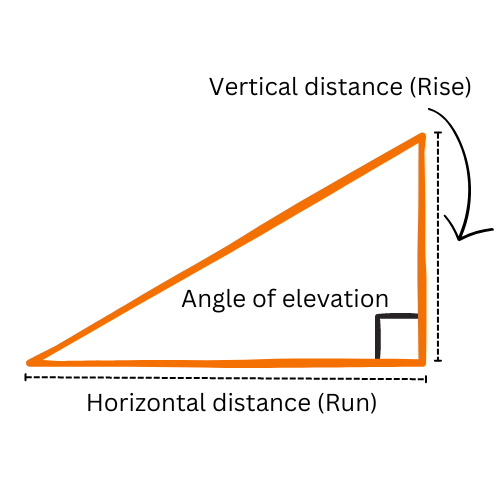
A Slope Elevation Calculator determines the inclination between two points by comparing their elevation difference with the horizontal distance separating them.
The result describes the straight-line slope between those points. It does not capture every change in terrain along the route.
How to Use the Slope Elevation Calculator
- Enter the starting elevation: Use the elevation of Point A.
- Enter the ending elevation: Use the elevation of Point B.
- Enter the horizontal distance: Measure the horizontal separation, not the distance along the slope.
- Review the angle: The result expresses the slope in degrees.
Use elevations measured from the same reference level. When calculating manually, convert the elevation difference and horizontal distance to matching units.
Formulas Used in the Calculator
1. Calculate the Elevation Difference
Subtract the starting elevation from the ending elevation:
Elevation Difference=Ending Elevation−Starting Elevation
A positive result indicates a rise from start to finish. A negative result indicates a fall.
2. Calculate the Gradient
Divide the elevation difference by the horizontal distance:
Gradient=Horizontal DistanceElevation Difference
The gradient is dimensionless when both measurements use the same unit.
To express it as a percentage:
Slope Percentage=Horizontal DistanceElevation Difference×100
For example, a gradient of 0.05 represents a 5% slope, or a vertical-to-horizontal ratio of 1:20.
3. Calculate the Slope Angle
When the arctangent function returns radians, convert the result to degrees:
Slope Angle (degrees)=arctan(Horizontal DistanceElevation Difference)×π180
If using a scientific calculator in degree mode, the arctangent result is already in degrees; do not apply the conversion again.
Example Calculation
Assume:
- Starting elevation: 100 m
- Ending elevation: 120 m
- Horizontal distance: 200 m
Step 1: Calculate the Elevation Difference
Elevation Difference=120−100=20 m
Step 2: Calculate the Gradient and Percentage
Gradient=20020=0.1
Slope Percentage=0.1×100=10%
The vertical-to-horizontal ratio is 1:10: one unit of rise for every ten horizontal units.
Step 3: Calculate the Slope Angle
Slope Angle=arctan(20020)×π180≈5.71∘
The slope rises at approximately 5.71° from Point A to Point B. For comparison, the same slope has a gradient of 0.1 and a percentage of 10%.
Frequently Asked Questions
1. Is horizontal distance the same as distance along the slope?
No. Horizontal distance is the level separation between the points. Distance measured along an inclined surface is longer. Using slope distance in place of horizontal distance changes the calculated angle.
2. What does a negative slope angle mean?
With the signed formula shown above, a negative angle means the ending point is lower than the starting point. Reversing the two elevations reverses the sign but preserves the angle’s magnitude.
3. Are slope percentage and slope angle the same?
No. Percentage describes vertical change relative to horizontal distance, while degrees describe an angle. For example, a 10% slope is approximately 5.71°, not 10°.
4. What happens if both elevations are equal?
The elevation difference is zero. For a positive horizontal distance, the slope angle is 0°, indicating no net rise or fall between the endpoints.
5. Can I enter zero horizontal distance?
The formula shown requires a horizontal distance greater than zero. With zero horizontal distance, the division is undefined. A nonzero elevation change directly above or below the starting point represents a vertical direction.
6. Can this calculator describe an uneven route?
It calculates the overall slope between the two entered points. An uneven route can contain steeper or flatter sections, so calculate those sections separately when their individual slopes matter.
Check out 3 Similar Calculators: